NOTES & EXPLORATIONS
Kubeflow--上手体验101
Table of Contents
1. Center UI
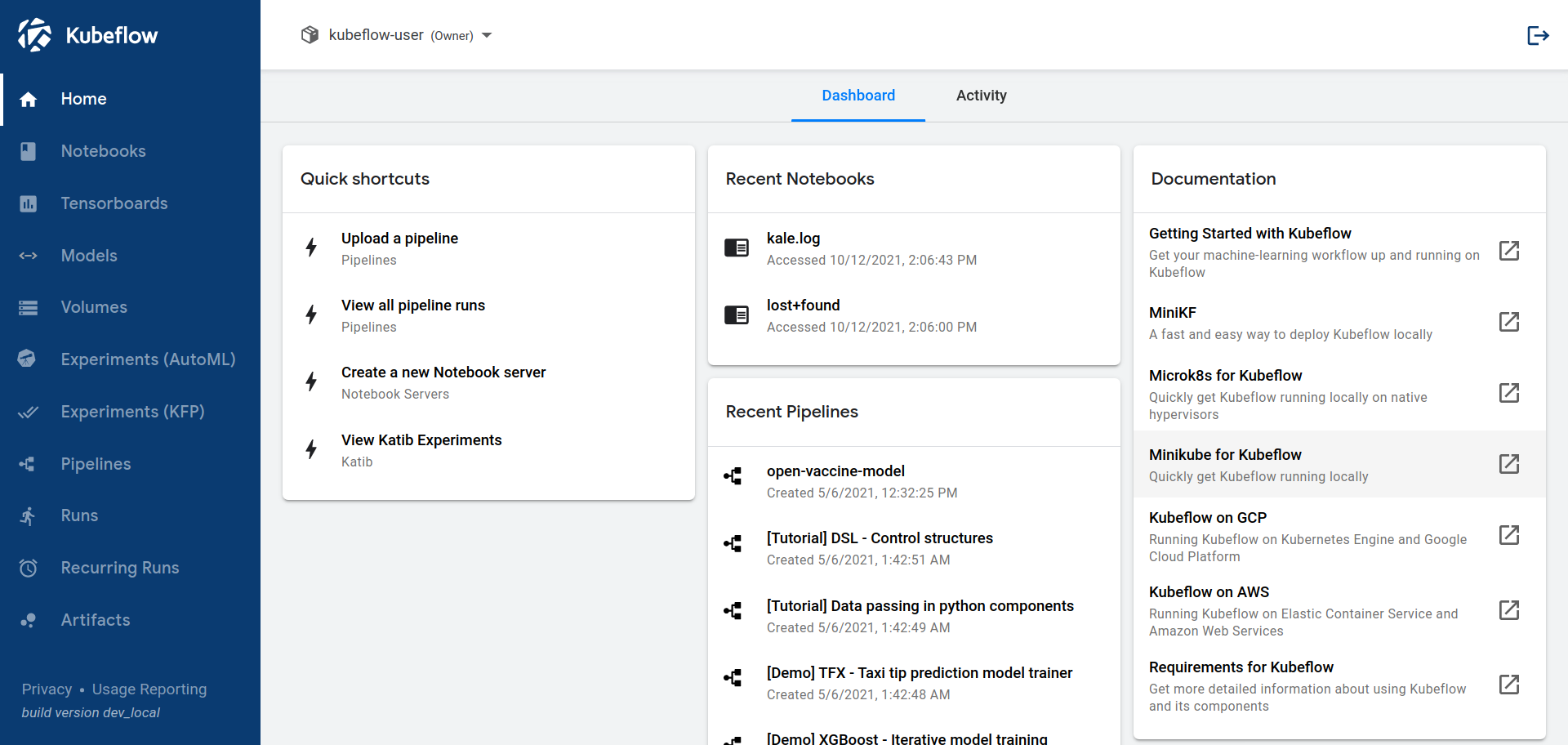
- 找到 Kubeflow UI 界面的进入地址
Kubeflow UI 通过 istio-ingressgateway 映射出去(namespaces= istio-system),找到IP 和port 通过浏览器访问
kubectl get svc -n istio-system |grep istio-ingressgateway
2. Notebook
2.1. 阿里云镜像
registry.cn-hangzhou.aliyuncs.com/kubeflow-images-public/tensorflow-1.15.2-notebook-cpu:1.0.0
registry.cn-hangzhou.aliyuncs.com/kubeflow-images-public/tensorflow-1.15.2-notebook-gpu:1.0.0
registry.cn-hangzhou.aliyuncs.com/kubeflow-images-public/tensorflow-2.1.0-notebook-cpu:1.0.0
registry.cn-hangzhou.aliyuncs.com/kubeflow-images-public/tensorflow-2.1.0-notebook-gpu:1.0.0
NAME                                           TYPE        CLUSTER-IP       EXTERNAL-IP   PORT(S)             AGE
admission-webhook-service                      ClusterIP   10.100.164.20    <none>        443/TCP             24h
application-controller-service                 ClusterIP   10.101.88.149    <none>        443/TCP             24h
argo-ui                                        ClusterIP   10.102.39.153    <none>        80/TCP              24h
centraldashboard                               ClusterIP   10.101.15.70     <none>        80/TCP              24h
jupyter-web-app-service                        ClusterIP   10.111.117.121   <none>        80/TCP              24h
katib-controller                               ClusterIP   10.101.5.213     <none>        443/TCP,8080/TCP    24h
katib-db-manager                               ClusterIP   10.106.222.135   <none>        6789/TCP            24h
katib-mysql                                    ClusterIP   10.98.66.254     <none>        3306/TCP            24h
katib-ui                                       ClusterIP   10.98.28.166     <none>        80/TCP              24h
kfserving-controller-manager-metrics-service   ClusterIP   10.109.80.123    <none>        8443/TCP            24h
kfserving-controller-manager-service           ClusterIP   10.98.213.97     <none>        443/TCP             24h
kfserving-webhook-server-service               ClusterIP   10.96.186.43     <none>        443/TCP             3h41m
metadata-db                                    ClusterIP   10.96.18.177     <none>        3306/TCP            24h
metadata-envoy-service                         ClusterIP   10.111.194.68    <none>        9090/TCP            24h
metadata-grpc-service                          ClusterIP   10.111.152.189   <none>        8080/TCP            24h
metadata-service                               ClusterIP   10.98.202.224    <none>        8080/TCP            24h
metadata-ui                                    ClusterIP   10.109.150.207   <none>        80/TCP              24h
minio-service                                  ClusterIP   10.96.254.24     <none>        9000/TCP            24h
ml-pipeline                                    ClusterIP   10.98.253.252    <none>        8888/TCP,8887/TCP   24h
ml-pipeline-ml-pipeline-visualizationserver    ClusterIP   10.103.158.56    <none>        8888/TCP            24h
ml-pipeline-tensorboard-ui                     ClusterIP   10.108.221.153   <none>        80/TCP              24h
ml-pipeline-ui                                 ClusterIP   10.109.108.83    <none>        80/TCP              24h
mysql                                          ClusterIP   10.97.47.116     <none>        3306/TCP            24h
notebook-controller-service                    ClusterIP   10.101.143.121   <none>        443/TCP             24h
profiles-kfam                                  ClusterIP   10.109.152.4     <none>        8081/TCP            24h
pytorch-operator                               ClusterIP   10.103.27.51     <none>        8443/TCP            24h
seldon-webhook-service                         ClusterIP   10.105.245.50    <none>        443/TCP             24h
tensorboard                                    ClusterIP   10.102.176.229   <none>        9000/TCP            24h
tf-job-operator                                ClusterIP   10.103.77.16     <none>        8443/TCP            24h
2 使用KubeFlow进行TF分布式训练
启动TensorFlow的训练就很简单了。编写以下的配置文件。
apiVersion: kubeflow.org/v1
kind: TFJob
metadata:
  generateName: tfjob
  namespace: kubeflow
spec:
  tfReplicaSpecs:
    PS:
      replicas: 1
      restartPolicy: OnFailure
      template:
        spec:
          containers:
          - name: tensorflow
            image: gcr.io/your-project/your-image
            command:
              - python
              - -m
              - trainer.task
              - --batch_size=32
              - --training_steps=1000
    Worker:
      replicas: 3
      restartPolicy: OnFailure
      template:
        spec:
          containers:
          - name: tensorflow
            image: gcr.io/your-project/your-image
            command:
              - python
              - -m
              - trainer.task
              - --batch_size=32
              - --training_steps=1000
这个配置文件并没有多少特殊之处。只有两个地方:
kind: 值是TFJob,这是这个Custom Resource固定的名字
spec.tfReplicaSpecs: 这里可以定义多个replica的类型、数量和具体的容器
类型的可选值是[Chief|Ps|Worker|Evaluator],跟TensorFlow保持一致
replicas表示数量,比如这次训练时1个PS+3个Worker
template跟Pod, Deployment等保持一致,主要定义镜像名,启动参数,使用的资源等等
启动这个训练任务也跟普通的K8S没有区别。
kubectl apply -f tf_job_mnist.yaml
结束了?嗯,就这么多,没了。TFJob Operator就是这么简单,或者说用KubeFlow来训练机器学习模型就这么简单。那KubeFlow到底做了什么事情呢?
3. 云原生工作流-argo
为什么选择Argo工作流?
从头开始设计容器,而没有传统VM和基于服务器的环境的开销和限制。
与云厂商无关,可以在任何Kubernetes集群上运行。
在Kubernetes上轻松编排高度并行的工作。
Argo Workflows使一台云级超级计算机触手可及!
云原生工作流-argo
4. 参考资料
一个问题,通向下一个问题。
继续探索知识库 →